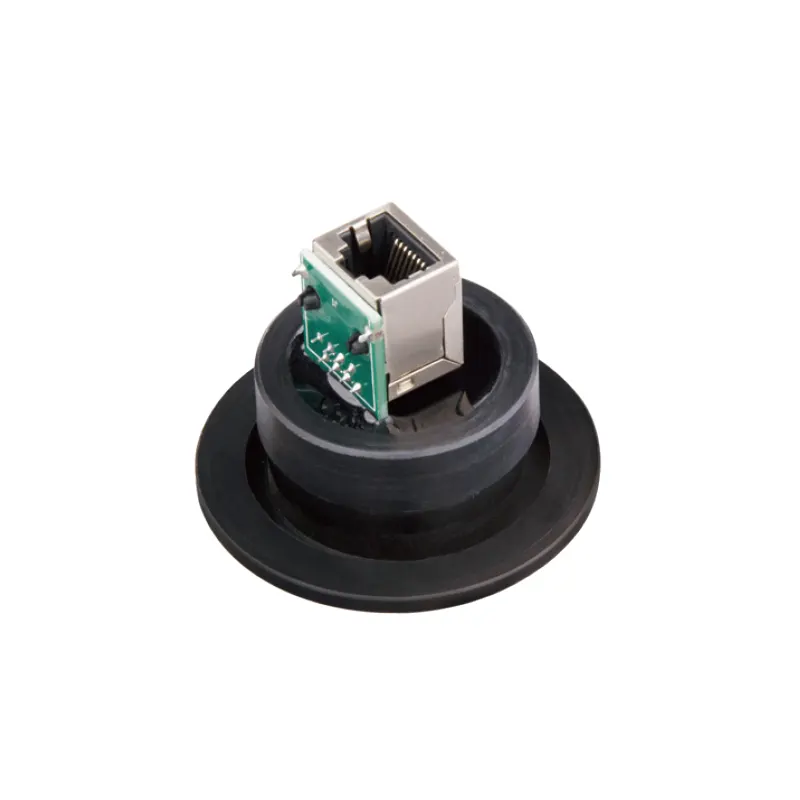
A KF40 Ethernet Feedthrough is a glove box accessory that brings a wired Ethernet connection through the enclosure wall at a KF40 flange. It sits at the boundary between the controlled atmosphere inside the box and the network, computer, or instrument outside. Its purpose is to let data cross that boundary without opening the box, forcing a cable through a glove port, or leaving a door seal partly open. It is an interface, not a gas purifier, vacuum pump, or atmosphere controller.
The KF40 Ethernet Feedthrough listed by TENCAN is the product discussed here. The available product information identifies the flange type and the Ethernet function. The remaining choices depend on the host enclosure, the cable, and the instrument, so the installation should be checked against the actual configuration rather than assumed from the product name alone.
What Does a KF40 Ethernet Feedthrough Do?
A feedthrough is a sealed penetration through an enclosure wall. The KF40 part of the name refers to the flange interface; KF is a quick-release vacuum flange family used to make demountable connections. The Ethernet part refers to the signal type. A useful way to read the name is therefore: a network connection packaged as a flange-mounted, sealed boundary component.
Inside the box, the feedthrough may present a socket, a short cable pigtail, or another connection point. Outside, it may do the same. The exact arrangement is a product detail that should be confirmed, because it determines whether the user needs a patch cable with a molded plug, a field-terminated cable, or a specific mating connector. The feedthrough does not translate one network protocol into another, and it does not improve signal quality by itself. It provides a physical path through the enclosure boundary while limiting the disturbance to the atmosphere.
Where It Sits in the System
This component is normally mounted on a side wall, rear wall, or dedicated flange port of a glove box. The atmosphere side connects to the instrument, sensor, camera, data logger, or computer that must remain inside the controlled environment. The room side connects to a network switch, laboratory PC, or data acquisition system. A short service loop on each side gives the cable room to bend and reduces strain on the connector.
The flange is more than a hole. A KF connection relies on a mating flange, a centering ring or seal, and a clamp. The feedthrough body provides the sealed conductor path, but the installation provides the vacuum-tight joint. If the box has no suitable port, the project becomes an enclosure modification, not just an accessory purchase. That distinction matters for planning, leak testing, and validation.
How Does It Preserve the Glove Box Atmosphere?
The feedthrough is passive. It does not circulate gas, remove oxygen, remove moisture, or regenerate purification material. It preserves the atmosphere only by providing a closed path for the data cable and by allowing the enclosure to remain closed during normal operation. The actual atmosphere control still comes from the glove box and its gas purification or gas replacement system, depending on the box type.
Every added penetration creates a potential leak path. The seal must be made at two places in concept: between the feedthrough and the flange, and around the conductor or connector body where it passes through the feedthrough housing. The materials used for the housing, insulator, O-ring, and connector parts must be suitable for the internal atmosphere and for any cleaning agents used on the box. A feedthrough that is mechanically tight but chemically incompatible can still cause problems through outgassing, corrosion, or seal degradation.
Installation quality is as important as the part. The flange faces should be clean and undamaged. The seal should be seated correctly. The clamp should be appropriate for the flange. The cable should be supported so that its weight is not carried by the connector or the seal. After installation, the boundary should be leak-checked using the procedure appropriate for the glove box. If the feedthrough is removed or replaced, the same checks should be repeated. A feedthrough is not a fit-and-forget item if the atmosphere is critical.
Which Parts and Configuration Details Matter?
The available product information for this item is brief: it is identified as a KF40 Ethernet feedthrough. That is enough to identify the general role, but not enough to promise a particular data rate, connector style, seal material, or electrical rating. The following details are the ones to verify before purchase or integration.
Flange and Sealing Interface
Confirm that the glove box port is actually KF40 and that the mating clamp, centering ring, and seal are available. A KF flange family includes several sizes, and a near match is not a safe substitute. Check the available clearance around the port, because a connector and a bending cable need more room than a blank flange. If the feedthrough is mounted on a thin wall or a removable panel, confirm that the panel can support the load and that the joint can be sealed without distortion.
Network Connection and Signal Path
Ethernet is a family of networking standards, not a single connector shape. Ask whether the feedthrough presents an RJ45 jack, a cable pigtail, or another terminal arrangement; whether the shield is carried through the body; and whether the feedthrough is suitable for the cable category and speed required by the instrument. If the device uses Power over Ethernet, verify that the feedthrough is rated for the associated voltage and current. The product name alone should not be read as confirmation of PoE, shielded operation, or a specific Ethernet category.
Materials and Atmosphere Compatibility
The internal atmosphere may contain nitrogen, argon, or another working gas, and it may also contain solvent vapor, trace acids, or reactive species from the process. The feedthrough housing, insulator, seal, and cable jacket should be checked against that mix. A component that works well in a clean, dry inert atmosphere may not be the best choice where solvent vapors are present. Cleaning agents matter too, because repeated wiping can affect plastics and elastomers. This is also why a particle filter, a solvent adsorber, and a data feedthrough should not be treated as interchangeable accessories: each solves a different problem.
Mechanical Integration
Plan the cable route before mounting anything. Check the minimum bend radius of the cable, the length needed to reach the instrument without tension, and the space needed for the connector outside the box. Use strain relief or cable ties on the cabinet side so that movement does not pull on the sealed connection. If the feedthrough has a fixed pigtail, protect the free end during installation. If it has a bulkhead connector, keep the mating connector clean and capped when it is not in use.
Which Specifications Should You Check Before Ordering?
The table below is a practical checklist, not a specification sheet for a particular unit. The exact values must come from the product documentation or from TENCAN.
| Check | Why it matters | What to confirm |
|---|---|---|
| Flange match | Prevents a forced or leak-prone joint | KF40 port, clamp, centering ring, seal, and clearance |
| Connector arrangement | Determines cables and mating parts | Jack or pigtail, pinout, shield continuity, and cable category |
| Electrical rating | Supports the intended signal or PoE load | Voltage, current, PoE compatibility, and grounding |
| Seal materials | Affects compatibility and service life | Elastomer, insulator, housing, and cable jacket materials |
| Mechanical limits | Protects the seal and the data connection | Mounting torque, panel thickness, bend radius, and strain relief |
| Leak test method | Verifies the installed boundary | Procedure, acceptance criterion, and re-test after service |
Where Is It Suitable, and What Are Its Limits?
A KF40 Ethernet feedthrough is suitable when a controlled-atmosphere enclosure needs a wired network connection and has, or can be fitted with, a compatible KF40 port. Typical uses include connecting an analyzer, a balance, a camera, a data logger, a test fixture, or a small computer inside the box to a network or PC outside. It can reduce the need to pass laptops, drives, or cables through an antecamber, and it can keep the box closed while data are collected. That is useful in materials research, battery and solid-state battery work, perovskite and OLED research, semiconductor processing, and other air-sensitive laboratory work where a stable data link is needed.
The limits are just as important. The feedthrough does not create a purified atmosphere; it cannot lower oxygen or moisture by itself. It does not replace a gas purification system, a vacuum pump, a solvent adsorber, or a HEPA filter. It does not make an unsealed enclosure hermetic. It cannot be assumed to fit every glove box, because flange size, port location, wall thickness, and internal clearance vary. It is not automatically suitable for every chemical environment, and it is not a sterile, cleanroom-grade, or biological containment device. If the application involves hazardous voltages, reactive gases, or a regulated process, the installation must be reviewed against the appropriate safety and site requirements rather than treated as a simple cable accessory.
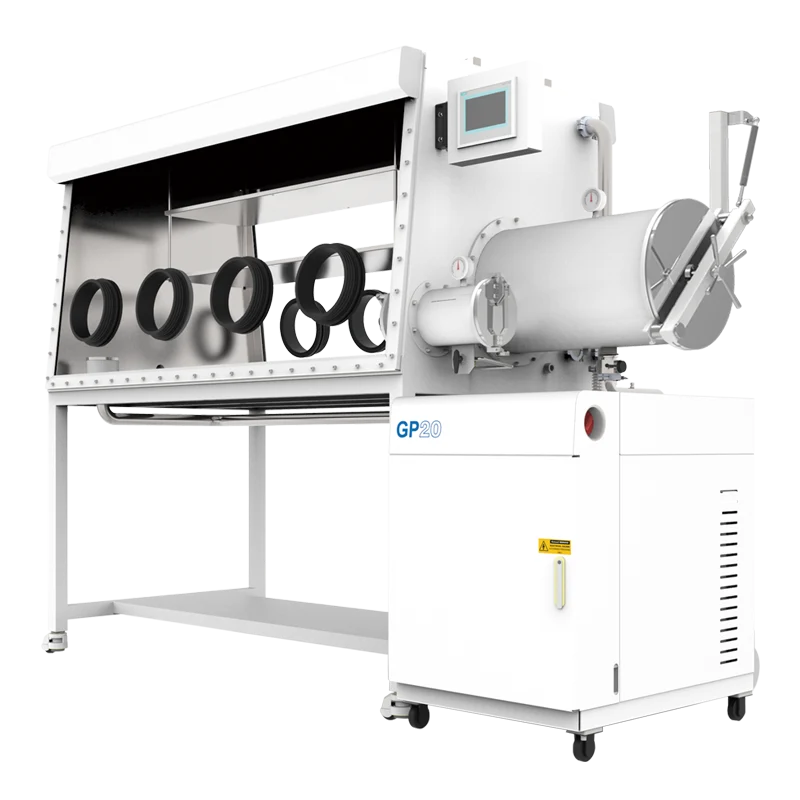
The four-station double-sided glove box with gas purification system is an example of a larger host enclosure where feedthrough planning matters. The image below shows that host context only. The supplied information does not establish that the KF40 Ethernet feedthrough is compatible with every configuration of that box or any other box. Port availability and internal clearance still need to be confirmed.
How Should You Select and Integrate It?
Start with the data link, not the flange. Define what the internal instrument needs: a simple network connection, a shielded cable, a specific connector, or Power over Ethernet. Confirm the cable category and the distance to the switch or PC. Then verify the enclosure side: KF40 port, clamp and seal, wall thickness, clearance, and the route to the instrument. A feedthrough that matches the network but not the box is no easier to install than one that matches the box but not the instrument.
- Confirm the exact product configuration with TENCAN, including connector style, seal material, and electrical ratings. The KF40 Ethernet Feedthrough product page is the starting point, but the final configuration should be checked for the intended use.
- Inspect the host box for a true KF40 port and enough room for the connector, cable bend, and clamp. Do not enlarge or adapt a port unless the modification is approved for the enclosure.
- Check chemical compatibility with the working gas, solvent vapors, and cleaning agents. Select seal and cable materials accordingly.
- Plan cable support on both sides. Leave a service loop, respect the bend radius, and avoid hanging the cable from the connector.
- Install according to the manufacturer's instructions, then leak-check the boundary before returning the box to critical service. Repeat the check after any removal or replacement.
- Record the installed configuration, cable type, and test result so that future maintenance does not depend on memory.
FAQ
Does a KF40 Ethernet feedthrough purify the glove box atmosphere?
No. It is a passive data interface. Gas purification, vacuum, and gas replacement are functions of the host system, not of the feedthrough.
Can it directly lower oxygen or moisture?
No. It can help keep the box closed while data are transferred, but the oxygen and moisture levels depend on the enclosure, the purification or purge system, and the operating procedure.
Is it compatible with any glove box?
No. It requires a compatible KF40 port and a correctly installed seal. The port size, clearance, wall construction, and atmosphere must all be checked.
Can it carry Power over Ethernet?
Only if the specific product configuration is rated for the voltage and current involved. The supplied product information does not list those ratings, so they must be confirmed.
Why use a feedthrough instead of a wireless link?
A wired link can be more predictable in a laboratory with metal enclosures and nearby equipment, and it avoids antenna placement inside the box. A wireless link avoids a penetration but brings its own constraints, including interference, power, and security. The choice depends on the instrument and the data requirement.
A KF40 Ethernet feedthrough is a small part with a narrow job: pass a network connection through a controlled boundary without turning that boundary into an open door. Its value comes from being selected for the right flange, connector, material set, and cable route, and from being installed and leak-checked as part of the glove box system. When those conditions are met, it supports cleaner data access and less disturbance to the atmosphere. When they are not, it is just another unverified penetration.