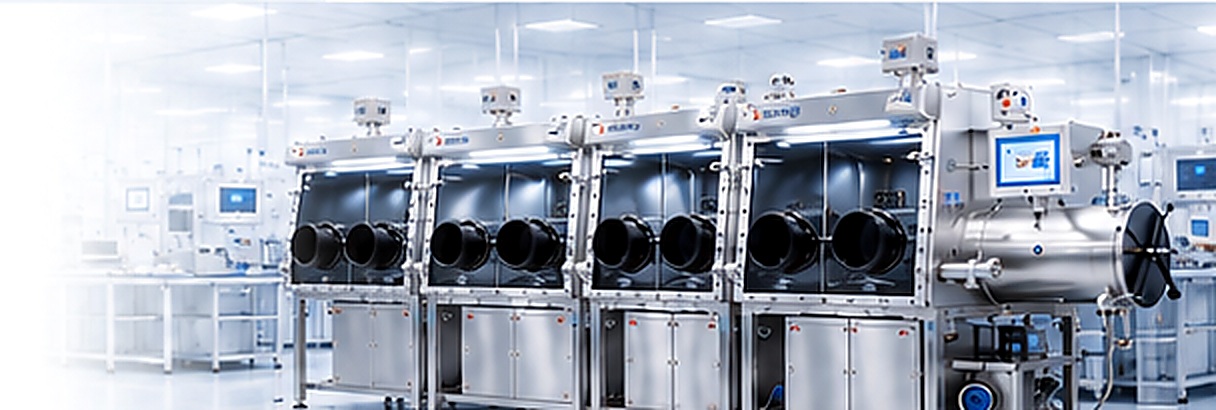
A KF40 Ethernet feedthrough is a sealed data interface that lets an Ethernet cable cross the wall of a glove box or another controlled-atmosphere enclosure without opening the box or running the cable through a glove port. It mounts at a KF40 flange, provides a network connection on the outside and inside, and preserves the enclosure boundary. It does not create or maintain the inert atmosphere; it makes networked instruments and data systems usable while the enclosure remains closed.
What Does a KF40 Ethernet Feedthrough Do and How Does It Work?
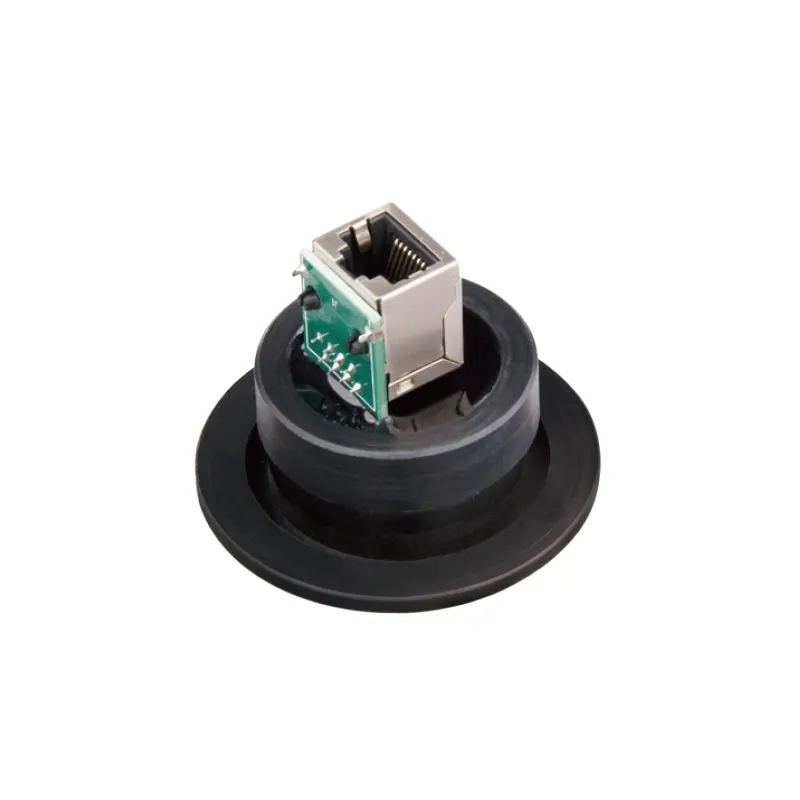
The feedthrough sits at the boundary between the laboratory environment and the controlled interior. On the outside, it presents a connector for a patch cable to a PC, switch, or data logger. On the inside, it presents a connector or cable tail for the instrument. Between the two ends are a metal body that passes through the KF40 port, a seal that closes the gap between body and flange, and an internal wiring path that carries the Ethernet signal.
KF40 refers to the flange interface, not to the data rate, connector type, or seal material. The flange is part of a standardized vacuum connection family, but the complete feedthrough - not the flange name alone - determines whether the assembly is suitable for a given box. The port must match the flange, the clamp and centering ring must be correct, and the seal must be compatible with the atmosphere and any solvent residues present.
Electrically, an Ethernet link uses differential pairs and often a shield or drain wire. Those conductors must pass through the feedthrough without being shorted to the body or to each other. If the shield is bonded to the metal housing at one or both ends, the installation creates a ground path that can affect noise, ground loops, and signal integrity. The correct arrangement depends on the instrument, the network, and the enclosure grounding.
The assembly is not simply a hole with a cable pushed through it. The sealed body and the connector seals are what keep the boundary closed. That is why installation details - clamp tightness, seal condition, cable support, and leak verification - matter as much as the Ethernet rating.
Why Data Cabling Is a Weak Point in Inert Atmosphere Work
Glove boxes are designed around a closed boundary. Gloves, antechambers, viewports, and transfer ports all create intentional interfaces, and each one has to be managed. A data cable that is simply passed through a door gasket or a glove port creates an uncontrolled interface. The door may not close correctly, the glove may be strained, and the cable jacket may be abraded. Even a small leak changes the atmosphere that the purification system is working to hold.
A feedthrough replaces that temporary route with a fixed one. The cable connects to the interior instrument, the door or glove remains closed, and the enclosure can be operated in its normal configuration. This is particularly useful when a device must remain connected for long periods: a balance, a camera, an analyzer, a test stand, or a data logger. The feedthrough also makes it easier to label and service the connection because the cable route is repeatable.
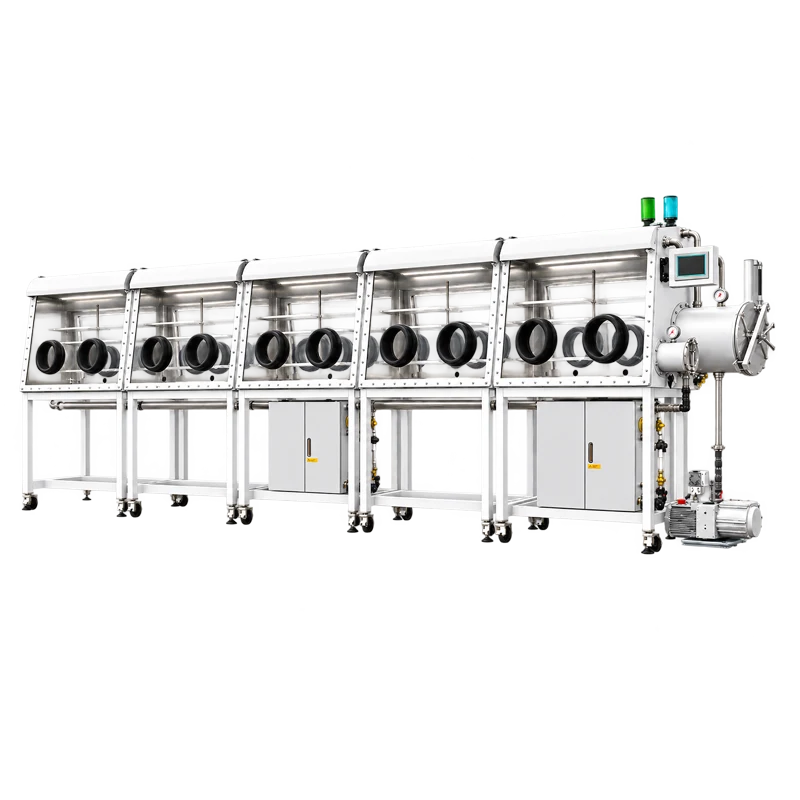
In a multi-user laboratory, the value is organizational as well as technical. The ten-station double-sided split-type glove box with gas purification system is an example of an installation where several work positions may share instruments, data channels, and monitoring equipment. A data feedthrough can support that kind of layout, but compatibility must be confirmed for the actual port, panel location, and internal clearance. The feedthrough is a boundary component; the box's purification system remains responsible for the water and oxygen levels.
That distinction is important. A clean data connection does not compensate for a poor seal, and a feedthrough does not remove moisture, oxygen, or solvent vapor. It only provides a controlled path for the cable.
Which Parts and Configurations Matter?
The current listing is a single product rather than a published family of variants, so the practical approach is to evaluate its functional sections. Each section answers a different question.
Flange and sealing interface
The KF40 flange is the mechanical and vacuum interface. Check that the port on the enclosure is a matching KF40 connection, that the clamp and centering ring are available, and that the seal material is compatible with the process. An O-ring that is acceptable for dry nitrogen may not be acceptable for solvent vapor, and a seal that is acceptable at room temperature may not be suitable for a heated process. The seal is a consumable; inspect it and replace it when it shows compression set, cracks, or contamination.
Connector pair and internal wiring
The outside and inside ends may be jacks, plugs, or cable tails. Confirm the connector type, the pinout, and whether the assembly is wired straight through. For Ethernet, the category rating and the connector quality affect the achievable link, but they do not tell you whether the feedthrough is vacuum-tight. Those are separate questions. If the instrument uses a non-standard connector, an adapter may be needed, and every adapter adds another contact and another potential failure point.
Cable jacket and internal cable route
The cable inside the box is part of the controlled environment. Its jacket can outgas, absorb solvents, or shed particles. A standard office patch cable is not automatically suitable for an inert enclosure. Check the jacket material, temperature range, abrasion resistance, and bend radius. Plan a service loop so that the connector is not under tension, and keep the cable away from sharp edges, moving gloves, and hot surfaces.
Shield, ground, and signal integrity
Ethernet is robust, but it is not immune to poor grounding. If the shield is bonded to the enclosure at both ends, a ground loop can appear. If it is left floating, common-mode noise may increase. The right choice depends on the instrument's grounding design and the site's electrical installation. For sensitive measurements, test the link after installation and compare error rates or signal quality with the cable route outside the box.
Mounting and service access
A feedthrough that is difficult to reach may be difficult to inspect. Check the clearance around the flange, the space needed to connect and disconnect the cable, and the route to the instrument. Label both ends. If the box has multiple workstations, a feedthrough on one side may not serve an instrument on the other side without a longer internal cable and additional strain relief.
Which Specifications Should You Check?
The KF40 name tells you about the flange interface only. The following checks turn that interface into a usable data path.
| Item | Why it matters | What to confirm |
|---|---|---|
| Flange and seal | Mechanical fit and boundary integrity | KF40 compatibility, clamp and centering ring, O-ring material, spare seal |
| Leak integrity | Atmosphere control | Manufacturer's leak specification and test method; verification after installation |
| Pressure and temperature | Mechanical and material limits | Rated differential pressure, bakeout or process temperature, cable and seal limits |
| Connector and category | Data link compatibility | Connector type, pinout, cable category, maximum supported link |
| Shield and ground | Signal quality and safety | Shield termination, ground continuity, ground-loop plan |
| Cable jacket | Cleanliness and chemical compatibility | Outgassing behavior, solvent resistance, abrasion resistance, bend radius |
| Power handling | Device supply | Whether PoE or other power is supported; voltage and current rating if applicable |
| Mounting | Installation quality | Panel thickness, orientation, clearance, torque per instructions |
Leak integrity deserves special attention because it is easy to assume that a vacuum flange guarantees a vacuum seal. The flange is only one part of the assembly. The seal, the feedthrough body, and the connector seals all contribute. After installation, follow the enclosure manufacturer's procedure for leak checking and atmosphere recovery. Do not use a pressure or leak value from a different product or a different flange size as if it applied here.
For the data side, do not confuse the connector's category label with a guarantee of link performance inside the box. A short internal cable may work at a higher rate than a long one, but the feedthrough, connectors, and cable all affect the result. If the instrument is critical, verify the link with the actual cable length and the actual network equipment before committing the installation.
Where Is It Suitable, and What Are Its Limits?
The most natural use is a glove box that contains a networked instrument or a device that needs a data connection to the outside. Examples include materials research equipment, battery and solid-state cell test stands, perovskite or OLED process monitoring, semiconductor sample handling, and air-sensitive chemistry where a computer or logger stays outside the enclosure. A feedthrough can also support cameras, environmental monitors, and data acquisition units when the cable and connector are appropriate for the box.
The limits are just as important as the applications. A KF40 Ethernet feedthrough does not purify the atmosphere, does not remove water or oxygen, and does not replace a gas purification system. It does not automatically provide electrical power; if a device needs Power over Ethernet, confirm that the feedthrough and its wiring are rated for the power and current involved. It is not a universal adapter for every KF40 port, and it is not a substitute for the enclosure manufacturer's instructions. It should not be treated as a sterile barrier, a biohazard barrier, or a hazardous-location safety device unless the complete system has been evaluated for that purpose.
Material compatibility is another boundary. A cable jacket that is fine in an office may release volatiles or soften in contact with a solvent. A seal that is fine for nitrogen may swell in a different gas or vapor. The feedthrough should be selected for the actual atmosphere, not for a generic idea of an inert box.
How Should You Select and Integrate It?
Start with the data link and work outward. Define the instrument connector, the network speed, the cable category, and whether power will be carried. Then trace the physical route from the outside cabinet to the inside instrument, including bend radius, service loop, and clearance around the flange. Only after those requirements are clear should you confirm the flange and seal.
- Define the link: record the connector type, pinout, data rate, cable category, and any PoE requirement. Do not assume that a generic Ethernet patch cable matches the instrument.
- Check the flange: confirm KF40 compatibility, clamp and centering ring, seal material, and access to the port.
- Review materials: check the cable jacket, seal, and body for compatibility with the process atmosphere, solvents, and temperature.
- Plan the ground: decide how the shield will be terminated and how ground loops will be avoided. Document the choice.
- Install with support: follow the manufacturer's instructions for clamp tightening and cable support. Avoid hanging the cable from the connector.
- Verify: leak check the installation, confirm the network link, and label both ends. Record the seal type and installation date for maintenance.
The KF40 Ethernet feedthrough product page is the right place to confirm the connector configuration, materials, and current specifications before ordering. Where the page does not state a value, ask for it rather than inferring it from the flange size.
Frequently Asked Questions
Does a KF40 Ethernet feedthrough purify the glove box atmosphere?
No. It is a sealed data path, not a gas purification device. Water and oxygen control come from the glove box's purification system, the gas supply, and the integrity of the enclosure.
Can it be installed on any KF40 port?
No. The port must match the feedthrough's flange and seal arrangement, and the installation must have enough clearance and support. Confirm the actual port and product interface before assuming compatibility.
Does it provide Power over Ethernet?
Not necessarily. Ethernet data and PoE power are different requirements. If the device needs PoE, confirm the feedthrough's power and current rating, the wiring, and the connector rating.
Can I use a standard Ethernet patch cable inside the box?
Only after checking the jacket material, outgassing behavior, solvent compatibility, and temperature range. An ordinary office cable may not be suitable for a controlled atmosphere.
Is it compatible with the ten-station double-sided split-type glove box?
Compatibility is not implied by the product names. It must be confirmed against the actual flange, panel location, internal clearance, and cable route on that box.